
Hey everyone! If you’re stuck with maps that just refuse to download in Bus Simulator Indonesia, you’re definitely not alone. A lot of players run into this headache, especially after updates or when using mods. Don’t worry I’ve put together a simple, step-by-step guide that actually works.
Whether you’re searching for How To Fix Map Downloading Problem In BUSSID or looking for the latest Bussid Maps Download Problem solve New Update, this post has you covered in plain, easy language.
Why Does the Map Keep Failing?
Before jumping into fixes, it helps to know what’s going wrong. Here are the most common reasons:
- Unstable internet or weak signal
- Not enough free storage on your phone
- Cache or data issues in the game or Play Store
- Missing app permissions
- Mismatch between APK, OBB, and game version
- Traffic mods breaking the normal map download process
Once you know the cause, fixing it becomes much easier.
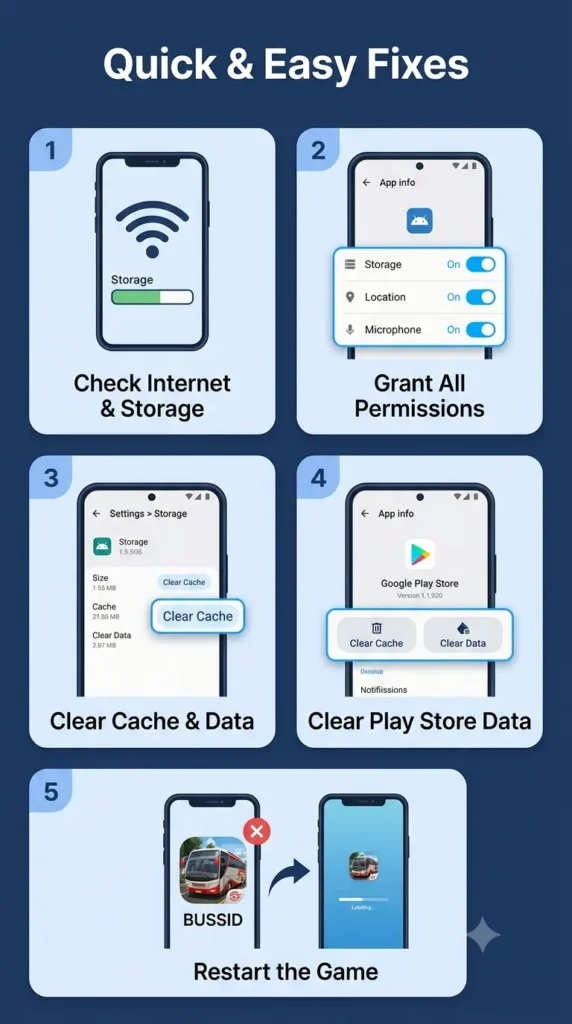
Quick & Easy Fixes That Work for Most Players
Try these basic steps first. Many people solve the problem right here.
1. Check your internet and storage
- Make sure you have a strong Wi-Fi or mobile data connection.
- Free up a few GB of space on your phone.
- Switch between Wi-Fi and mobile data, then try downloading again.
2. Give the app full permissions
- Long-press the BUSSID icon → App info → Permissions.
- Allow everything (especially Storage and Files).
- Open the game and attempt the map download once more.
3. Clear cache and data
- Go to Settings → Apps → Bus Simulator Indonesia → Storage.
- First tap Clear Cache.
- If that doesn’t help, Clear Data (you may need to log in again).
- Restart the game and try downloading.
4. Clear Google Play Store data
This is one of the most effective methods for How to fix map not downloading issue in Bussid:
- Long-press Play Store → App info → Storage → Clear Cache + Clear Data.
- Force stop the Play Store.
- Turn airplane mode on and off, or toggle your mobile data.
- Open BUSSID again and start the map download.
5. Simple restart trick
- Completely close the game.
- Wait a minute.
- Open it again and try downloading. Sometimes just waiting on the loading screen for a few minutes also works.
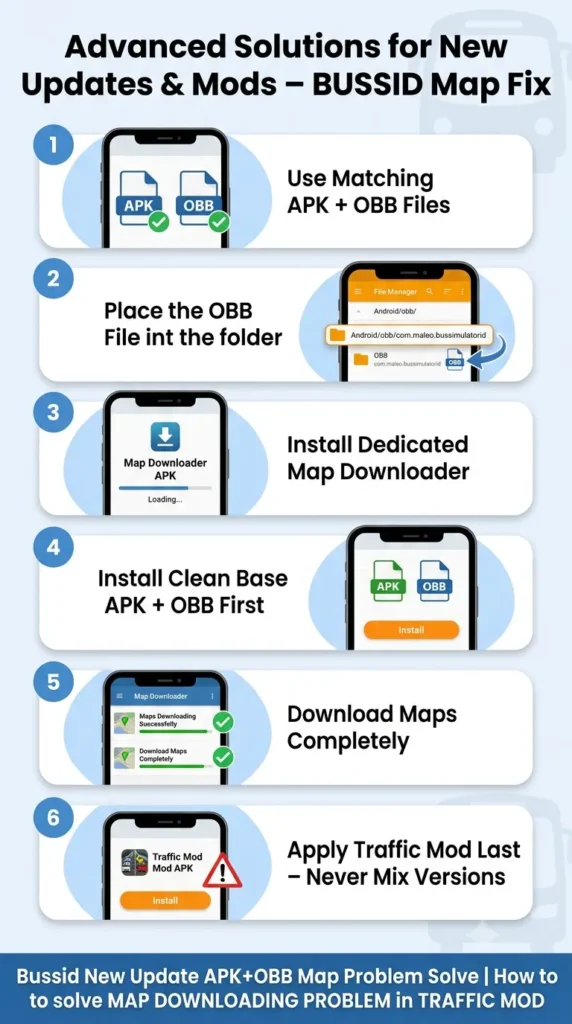
Advanced Solutions for New Updates & Mods
If the basic steps didn’t work, especially after a recent update, try these next-level fixes.
For Bussid New Update APK+OBB Map Problem Solve
- Always use matching APK and OBB files for the exact version you’re running.
- Place the OBB file correctly in the Android/obb folder.
- Many players use a dedicated Map Downloader APK from trusted community creators. Install it, let the maps download fully, then update or reinstall your preferred APK.
How to solve MAP DOWNLOADING PROBLEM in TRAFFIC MOD
Traffic mods are awesome but often cause the built-in maps to stop downloading. Here’s what usually works:
- First install a clean base APK + OBB that supports map downloading.
- Use the Map Downloader tool provided by the mod creator.
- Once maps are fully installed, apply or update the traffic mod APK.
- Never mix files from different versions.
These steps have helped thousands of players get BUSSID MAP DOWNLOAD PROBLEM FIXED.
Extra Tips for Smooth Gameplay
- Keep your phone’s software updated.
- Close background apps to free up RAM.
- Stick to one reliable source for mods instead of mixing random files.
- As a last resort, uninstall everything and reinstall the official game from the Play Store.
Frequently Asked Questions – BUSSID Map Not Working
Why is my BUSSID map not downloading?
This usually happens because of a weak internet connection, low storage space, missing app permissions, or corrupted cache. After game updates or when using traffic mods, the problem becomes even more common. Clearing cache or using a map downloader often solves it.
How To Fix Map Downloading Problem In BUSSID the easy way?
Start with these quick steps:
1.Make sure your internet is stable and you have enough free space.
2.Give BUSSID all permissions.
3.Clear the game cache and Play Store data.
4.Restart the game and try downloading again.
Most players fix the issue with just these basic steps.
What should I do if the map is stuck on loading forever?
Close the game completely, wait one minute, and reopen it. You can also turn airplane mode on and off or switch between Wi-Fi and mobile data. Sometimes simply waiting a few minutes on the loading screen works.
Does clearing Play Store data really help with map not downloading issue in Bussid?
Yes, it works for a lot of people. Long-press the Play Store app → App info → Storage → Clear Cache and Clear Data. Then force stop it, toggle your internet, and try downloading the map again in BUSSID.
I installed a traffic mod and now maps won’t download. How to solve MAP DOWNLOADING PROBLEM in TRAFFIC MOD?
Traffic mods often break the normal map download system. The best fix is:
1.Install a clean base version of the game first.
2.Use a compatible Map Downloader.
3.After the maps are fully installed, apply the traffic mod again.
This order usually solves the problem.
What is the best way for Bussid New Update APK+OBB Map Problem Solve?
Always use matching APK and OBB files for the exact game version. Place the OBB correctly in the Android/obb folder. Many players also use a dedicated Map Downloader APK from trusted community sources after updating. This combination fixes most new-update map issues.
Will clearing data delete my progress in BUSSID?
Clearing only the cache is safe and won’t remove progress. Clearing full data may require you to log in again, but your online progress is usually saved if you are signed in with your account.
Is there a permanent fix for BUSSID MAP DOWNLOAD PROBLEM FIXED?
Yes. Once you successfully download the maps using the correct method (especially with a Map Downloader after updates or mods), the problem usually doesn’t return unless you change versions or install conflicting files again.
Can low storage really stop maps from downloading?
Absolutely. Maps take up a good amount of space. Free up at least 2–3 GB on your phone before trying again. Many players are surprised when this simple step finally works.
Final Thoughts
The BUSSID Map Not Working issue can be annoying, but it’s almost always fixable. Start with the simple checks (internet, storage, permissions, and clearing cache). If you’re dealing with a new update or traffic mods, the Map Downloader + matching APK+OBB method usually solves it for good.
Whether you were looking for How To Fix Bussid Map Downloading Problem or the complete How To Fix Map Downloading Problem In BUSSID, I hope this guide gets you back on the road quickly. Drive safe and enjoy those beautiful Indonesian routes!